
Crorebet App for iPhone: iOS Setup and Safari Limits
The Crorebet app for iPhone is a Safari web app, not an App Store download. You open the site, add it to your home screen, and get a full-screen icon that handles gaming, UPI deposits, document upload and IMPS withdrawals. Notifications and background refresh are what you lose.
Open it in Safari
No file, no permissions, about 60 MB of free space — and ₹0.
Open the Site in Safari- 18+ only
- Anjouan licensed
- Nothing to install
- UPI supported
- IMPS payouts
The iOS route in numbers
Everything an iPhone owner needs to decide, measured on an iPhone 12 running iOS 17.5 over Jio 4G in Pune.
| Property | Value |
|---|---|
| Delivery method | Safari home-screen web app — no App Store listing |
| File downloaded | None |
| Minimum iOS | 14 (older releases break the saved session) |
| Setup time observed | 40 seconds, six taps |
| First launch from icon | 2.9 s (Android app: 2.4 s) |
| Storage after four days | 34 MB of Safari website data |
| Price | ₹0 — no purchase or subscription |
| Languages | Hindi (default), English |
| Deposits and withdrawals | Both work — UPI in, IMPS out |
| Push notifications | Unreliable |
Last verified: 20 August 2026 on iPhone 12 (iOS 17.5) and iPad 9th generation (iPadOS 17).
On this page
Why is there no App Store build?
Apple's rules for real-money gaming are the reason, and they apply to the category rather than to one brand. Apple requires that an app taking real-money wagers is submitted by the licensed operator itself, and that its availability is restricted to the territories where that licence is valid. Free download and geo-restriction are both conditions of listing.
This operator holds an Anjouan gaming licence, ALSI-202409041-FI2, issued by a jurisdiction outside India. There is no Indian licensing regime that Apple recognises for this category, and the national framework itself is contested in the courts. With no qualifying licence to point at for the Indian store front, a listing for Indian users is not available.
What that means for you is narrower than it sounds. You are not missing features by going the web route; you are missing Apple's review, its automatic updates and its notification plumbing. The Android package guide shows what a native build looks like by comparison.
What is a progressive web app?
It is a website that behaves like an installed app once you add it to your home screen. iOS gives it an icon, a launch screen and its own window with no address bar or browser chrome, while the code still runs inside Safari's engine.
Definition: progressive web app (PWA)
A progressive web app is a site built to be installable. It declares an icon, a name and a display mode in a manifest file, and caches part of itself locally so it starts quickly. The operating system treats it as an app shell rather than as a bookmark.
The practical difference from a bookmark is session handling. A bookmark reopens a Safari tab and inherits whatever state that tab had; an installed web app keeps its own storage, so you stay signed in between launches. That single behaviour is why the iOS 14 floor matters, and why adding a shortcut on an older phone leaves you re-entering credentials constantly.
How do you add it to your iPhone home screen?
Six taps in Safari, and it took 40 seconds on our iPhone 12 on 17 August 2026. The only step people get wrong is the first one — Chrome and in-app browsers cannot do this.
- Open the site in Safari
Safari only. No other iOS browser can write an icon to the home screen, so the menu option simply will not appear.
- Let the lobby finish loading
Wait for the casino platform to render fully. Adding a half-loaded page saves a poor icon and a broken first launch.
- Tap the Share button
The square with an upward arrow, in the bottom toolbar on iPhone and at the top right on iPad.
- Choose Add to Home Screen
Scroll the share sheet until it appears. On iOS 17 and later it sits below the row of sharing targets.
- Shorten the name and tap Add
Trim the suggested label so it fits under an icon. The icon lands on the last page of your home screen.
- Launch from the icon, not Safari
It should open full-screen with no address bar. That missing address bar is how you confirm the install worked.
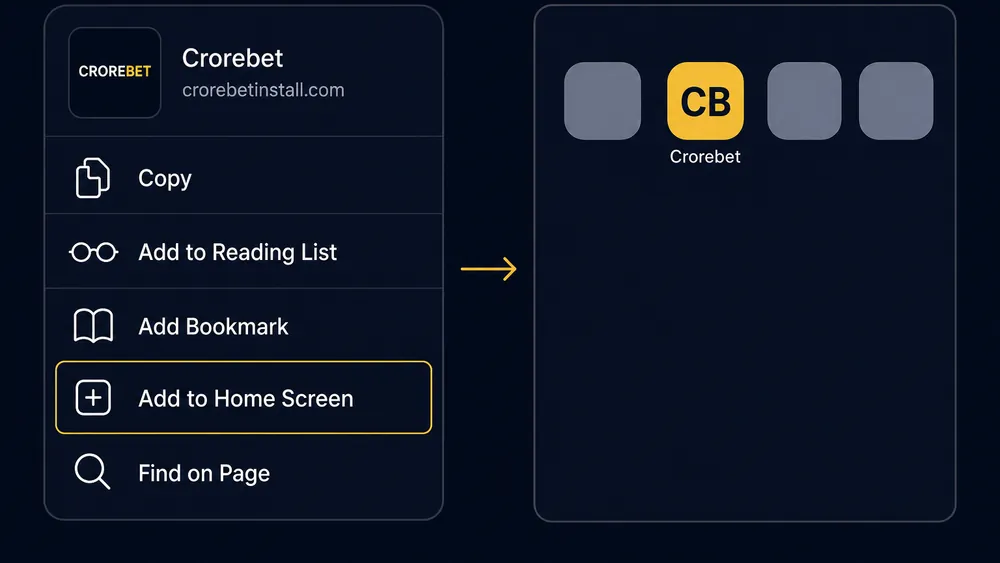
Sign in after installing, not before. A session created inside the installed shell persists between launches, while one created in a Safari tab does not carry across. Sign-in methods and OTP problems are covered on our login help page.
Six taps, no download
Full-screen icon · Hindi or English · deposits from ₹100.
Add It to Your Home ScreenWhat works on iOS and what is limited?
Everything involving money works; everything involving background activity is compromised. We ran each row below on the installed web app rather than assuming parity with Android.
| Feature | iOS web app | Android app |
|---|---|---|
| Pre-match and live casino play | Works | Works |
| Cash out on live markets | Works | Works |
| UPI deposits from ₹100 | Works | Works |
| Document upload for KYC | Works | Works |
| IMPS withdrawals | Works | Works |
| Casino and live dealer tables | Works | Works |
| Push notifications | Unreliable | Full |
| Background refresh of odds | Stops when closed | Continues |
| Offline shell | Icon only | Partial |
| Haptic feedback on stake slip | No | Yes |
The three limits that actually change behaviour: you will not be told a match has started, the odds you see after reopening the icon are refetched rather than live from a background connection, and nothing loads at all without a connection. Live-casino players feel the first one most, which is the strongest argument for using an Android phone if you own both.
On the money side we found no gap. A ₹100 UPI deposit approved in Google Pay credited the iPhone account in 11 seconds on 19 August 2026, and the cashier showed the same ₹500 withdrawal minimum as the Android build. Deposit mechanics and the failure paths are on our UPI deposit page.
Which iOS versions work?
iOS 14 upwards, with everything above it behaving the same. The floor exists because older versions handled installed web apps as glorified bookmarks, dropping their private storage and pushing you back into a Safari tab, which breaks a signed-in session.
Practically, an iPhone 6s or newer can reach iOS 15, which covers almost every handset still in daily use. On iOS 14 and 15 we saw slightly longer first paints — 4.1 seconds on an iPhone 8 against 2.9 on the iPhone 12 — but no functional difference in the stake slip or cashier.
If Add to Home Screen is missing from your share sheet, you are almost certainly not in Safari. The second most common cause is a Safari extension or content blocker interfering with the page, so disable those before assuming the site is at fault.
Does Chrome on iPhone change anything?
Not in performance, and not in your favour for installing. Apple requires every iOS browser to render with WebKit, the same engine Safari uses, so Chrome, Edge and Firefox on iPhone are different interfaces over identical page rendering.
What differs is capability at the edges. Only Safari can write a home-screen icon, and only a Safari-installed web app gets its own persistent storage. Chrome on iOS is a perfectly good place to browse odds; it is not a place from which you can install anything.
Does it work on an iPad?
Yes, with one change to the steps: Safari's Share button sits at the top right rather than in a bottom toolbar. Everything after that is identical, and the installed icon behaves the same way.
The wider screen is a genuine advantage. On an iPad 9th generation the cricket list showed eleven markets without scrolling against four on the iPhone, which makes pre-match comparison faster. Split View works too, although the odds panel compresses awkwardly below about half the screen width.
How does the web app update itself?
Silently, every time you open it. Because the interface is served from the operator's servers rather than installed from a package, you get the current version on launch with nothing to download and no version number to track.
That is the clearest advantage the iOS route holds over Android sideloading, where a stale build sits on the phone until you replace the file yourself. The trade-off is that you cannot stay on an older interface if an update changes something you liked, and you cannot use the app at all while the servers are being changed.
If the icon opens to a blank screen after an update, clearing Safari's website data for the site forces a fresh fetch. That fix and its Android equivalents are catalogued on our fault-finding page.
Always the current version
Nothing to update, nothing to sideload · 18+ · Anjouan licensed.
Launch the Web App- UPI
- PhonePe
- Google Pay
- Paytm
- IMPS
How do you remove it?
Delete the icon, then clear the stored website data — the second step is the one people skip, which leaves tens of megabytes behind.
- Withdraw your balance first
Request any remaining funds by IMPS and wait for them to land. Deleting an icon closes no account and moves no money.
- Delete the icon
Press and hold it, choose Remove Bookmark or Delete, and confirm. That removes the shortcut and its full-screen shell.
- Clear the website data
Settings → Safari → Advanced → Website Data, then swipe to delete the entry. This frees the cached scripts and images.
- Sign out on other devices
Deleting an icon on one device ends nothing on another. Sign out anywhere else you have used the account.
Pros and cons of the iPhone route
Pros
- No file to download, verify or sideload
- No permission dialog, and no access to your photos or camera until you upload a document
- Always the current interface, updated on launch
- Gaming, UPI deposits, KYC and IMPS payouts all work
- ~34 MB of cache against ~90 MB for the Android app
Cons
- Push notifications are unreliable, so promotions launch go unannounced
- No background refresh — odds reload when you reopen the icon
- Safari-only setup, and iOS 13 or older is effectively excluded
- Nothing works offline beyond the icon itself
Is the iPhone web app good enough?
For an iPhone owner this is a better outcome than the missing App Store listing suggests. Setup is 40 seconds with no file to check, the cashier is identical to Android's in both directions, and the interface is never out of date. The honest deduction is notifications: an live-casino player who relies on alerts to know a match has started is worse off here, and no setting fixes that. If you own both an iPhone and an Android phone, play from the Android one and use the iPad or iPhone for research. If iPhone is all you have, nothing here should stop you — and real-money gaming can lose you money on either platform.
Set it up on your iPhone
Safari · six taps · ₹0 · iOS 14 and later · Hindi and English.
Start on iPhone- 18+ only
- Anjouan licensed
- ₹100 min deposit
- IMPS payouts
Frequently asked questions
Is there a Crorebet app on the Apple App Store?
No. Apple requires real-money casino apps to be published by the licensed operator and restricted to territories where that licence applies. The operator holds an Anjouan licence rather than an Indian one, so no listing is available to Indian iPhone users.
How do I install Crorebet on my iPhone?
Open the site in Safari, tap the Share button, scroll to Add to Home Screen and confirm. That writes an icon which opens full-screen with no address bar. The whole process took us 40 seconds on an iPhone 12 and downloads no file.
Crorebet iPhone par kaise chalayen?
Safari me site kholiye, niche Share button dabaiye, phir Add to Home Screen chuniye aur Add par tap kariye. Home screen par icon aa jayega jo full-screen khulta hai. Koi file download nahi hoti aur koi permission nahi maangi jati.
Can I deposit and withdraw from the iPhone web app?
Yes, both work. UPI deposits from ₹100 open your payment app for approval exactly as they do on Android, and IMPS withdrawals to a bank account are requested from the same cashier screen. Document upload for verification also works through the iOS photo picker.
Why do I not get notifications on iPhone?
iOS treats web apps differently from native apps, and push delivery for a home-screen web app is unreliable in practice even where the operating system allows it. Expect to check promotions launch and settled rounds yourself rather than being told about them.
Which iOS version do I need?
iOS 14 is the practical floor. Below that, home-screen web apps lose their own session storage and get pushed back into a Safari tab, which breaks sign-in. Anything from iOS 14 to iOS 18 worked in our checks, with newer releases slightly faster.
Does the iPhone version work on an iPad?
Yes, and the steps are identical except that Safari's Share button sits at the top right. The layout uses the wider screen to show more markets at once, which makes an iPad the most comfortable screen for pre-match browsing.
Can I use Chrome instead of Safari on my iPhone?
You can browse in Chrome, but you cannot install from it. Every iOS browser runs on Apple's WebKit engine, so performance is broadly identical, yet only Safari can write an icon to the home screen. Use Safari for setup, then any browser afterwards.