
Crorebet Login: Methods, OTP Problems and Recovery
A Crorebet login needs the mobile number or email you registered with, plus either your password or a six-digit SMS code. Sign-in took under 20 seconds on our handsets. Most failures trace to one of five causes, and DND filtering on the number is the commonest of them.
Sign in and check your balance
Android app, iPhone web app or any browser — one account across all three.
Open the Login Screen- 18+ only
- Anjouan licensed
- Hindi and English
- UPI supported
- IMPS payouts
Which login methods are available?
Three, and the one you can use is decided at registration rather than chosen at sign-in. An account created with a mobile number will not accept an email address in the login form, which is behind a surprising share of "wrong password" complaints.
| Method | What you enter | Speed observed | Fails when |
|---|---|---|---|
| Mobile + one-time code | +91 and ten digits, then a six-digit SMS code | 18–46 s including SMS | DND filtering or poor signal delays the SMS |
| Mobile + password | +91 and ten digits, then your password | ~8 s | Password forgotten, or caps typed by autocorrect |
| Email + password | Registered address, then your password | ~9 s | Account was created with a number, not an email |
Timed across nine sign-ins between 15 and 20 August 2026 on Redmi Note 12, Redmi 9A and iPhone 12, Jio 4G in Pune.
On this page
How do you sign in, step by step?
Five taps and under a minute, with one detail that decides whether it works at all — the country code. Everything below is the same in the Android app, the iPhone web app and a desktop browser.
- Open the sign-in screen
Tap Login at the top right. If you have never registered, tap Register instead: signing in with an unknown number returns an account-not-found message.
- Choose mobile or email
Pick the tab matching your registration. The two are not interchangeable, and using the wrong one looks exactly like a wrong password.
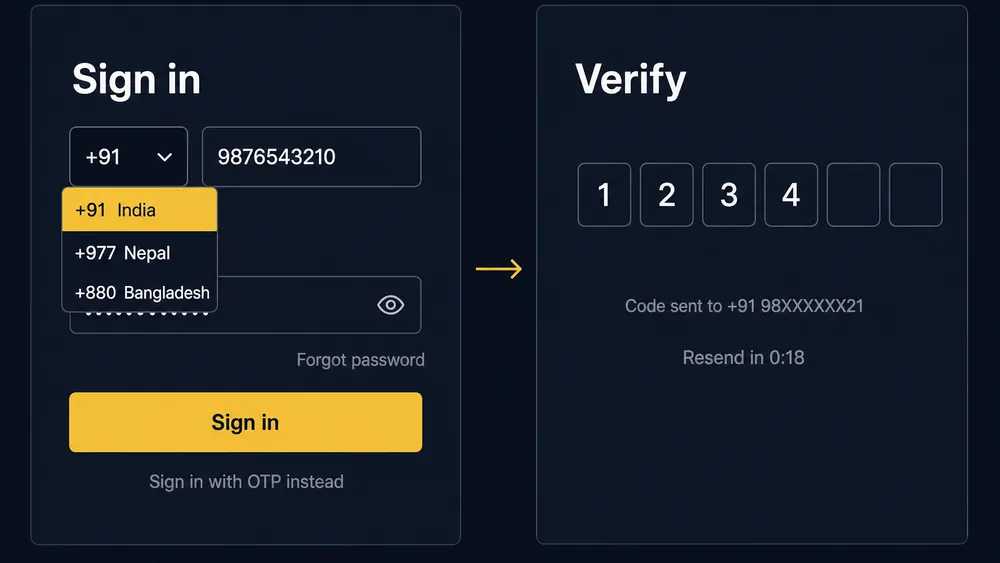
- Enter +91 and ten digits
No spaces, no leading zero. A wrong country code is the most common reason a code is never delivered.
- Supply a password or request a code
Type your password, or switch to the one-time code option for a six-digit SMS. The code expires within a few minutes.
- Confirm and check the balance
Wait for the lobby, then check the balance against what you expect. That is your confirmation you reached the right account.
Why does the OTP never arrive?
Five causes account for nearly every missing code, and only one of them is anything to do with the app. We reproduced each of the rows below deliberately rather than guessing at them.
| Symptom | Cause | Fix |
|---|---|---|
| No code at all, on any attempt | DND filtering on the number blocks transactional SMS | Deactivate full DND with your operator, or use the password method instead |
| Code arrives 5–20 minutes late | Carrier queue delay during peak hours | Wait; do not request three more codes, since each one cancels the last |
| Nothing arrives, no error shown | Wrong country code left on a foreign default | Reselect +91 and retype the ten digits |
| Codes stopped arriving recently | SMS inbox is full, so the phone silently rejects new messages | Delete old threads to free space, then request one code |
| Code sent to the wrong SIM | Dual-SIM phone sending from the unregistered number | Set the registered SIM as default for messaging, then retry |
Our own worst case was the DND row. On a Jio number with full DND active, we requested four codes across 12 minutes on 18 August 2026 and received none; the same request on a second number without DND delivered in 21 seconds. Nothing in the app's error text hints at this, which is why people reinstall instead of fixing the actual problem.
Definition: DND filtering
Do Not Disturb is a TRAI preference registered with your mobile operator. In its fullest setting it blocks commercial and promotional SMS, and gambling-related messages are routinely classified that way — so a legitimate sign-in code can be dropped by the carrier before it reaches your handset.
Set a password and stop depending on SMS. Once a password exists you have a route that never touches the carrier network. That single change removes four of the five rows above.
If codes arrive but sign-in still fails, the problem is on the app side rather than the network, and the fault-finding matrix covers login loops, blank screens and stuck spinners.
Sign in with a password instead
No SMS, no DND problem · one account on every device.
Access Your AccountHow do you reset a forgotten password?
Four steps from the sign-in screen, and it took us 2 minutes 15 seconds end to end on 20 August 2026. Do not create a fresh account as a shortcut — duplicates get frozen, not merged.
- Tap Forgot password
The link sits under the password field on the same sign-in screen.
- Enter your registered identifier
Give the exact number or email you signed up with. An unrecognised entry fails silently, so a dead end usually means the wrong identifier.
- Confirm the code
Type the six digits from the SMS or email. Wait two minutes before requesting a resend, because a new code invalidates the old one.
- Set a password you use nowhere else
Choose something unique to this account. Every other signed-in device is logged out when you finish.
Two things this process cannot do. It will not change the mobile number on the account — that needs support, because the number is tied to verification. And it will not help if you never confirmed the number at sign-up, in which case the account is incomplete rather than locked out; the registration guide covers that state.
What happens when you sign in on a new device?
Nothing dramatic — you enter your credentials, confirm a code if prompted, and the account opens with the same balance. The app does not tie itself to one handset, and there is no device-authorisation queue to wait for.
Expect a code request more often on a device the account has not seen before, even if you normally use a password. On 21 August 2026 we signed the same account in on a third device and were asked to confirm an SMS code once, then not again on subsequent launches from that phone.
Keep the registered number reachable while you do this. If the SIM lives in a phone you no longer use, put it back in for the length of the sign-in, or set a password beforehand while you still have access.
How many devices can stay signed in?
Three worked simultaneously in our testing, with no forced sign-out on any of them. We held live sessions on a Redmi Note 12, an iPhone web app and a desktop browser through a full T20 on 19 August 2026, placing stakes from two of them, and all three stayed authenticated.
No visible session manager exists, which is the real limitation. You cannot list active devices or end one remotely, so the only lever you have is a password change — that ends every session at once. Treat it as the emergency switch if you suspect somebody else has your credentials.
Why would an account be locked, and how do you recover it?
Four causes cover almost all locks, and only support can lift any of them. A lock is not the same as a failed sign-in: the form accepts your details and then refuses, usually with a message telling you to contact support.
- Repeated wrong passwords. A run of failed attempts triggers a protective lock. Waiting is often enough, and a reset is faster.
- A duplicate account. One account per person is the rule. A second sign-up on the same number, email, device or bank details freezes both while it is reviewed.
- Name mismatch at verification. If the account name and the bank account name differ, withdrawals stop and the account can be held until the documents agree.
- Unfinished verification past a threshold. Accounts that bet and then never complete document checks get restricted rather than closed.
The recovery route is the same in each case: open live chat from the app, state which of the four you think applies, and supply whatever document is requested. Our support test on 15 August 2026 drew a first human reply in 3 minutes 40 seconds. Escalation paths and a complaint template live on the customer care page.
Do not open a second account to get around a lock. That converts a solvable problem into the duplicate-account case, which is the hardest one to reverse and can put the balance out of reach.
When does a session time out?
Sessions in the Android app survived overnight in our testing, while browser sessions did not. Reopening the installed app the morning after a session still landed in the lobby; the same account in a desktop browser asked for credentials again after roughly eight hours of inactivity.
Two behaviours worth knowing. Uninstalling the app removes the stored session, so a reinstall always starts at sign-in. And a password change ends everything immediately, everywhere, including a session you have open at that moment.
Pros and cons of the sign-in system
Pros
- Three sign-in routes, so a blocked SMS is not a dead end
- Password sign-in completed in about 8 seconds on our devices
- Three simultaneous device sessions held without forced sign-out
- App sessions survive overnight, so no daily re-entry
- Password reset takes four steps and needs no support ticket
Cons
- No session manager, so you cannot see or end devices remotely
- Error messages do not distinguish a wrong method from a wrong password
- OTP delivery depends on DND status the app cannot detect
- Changing the registered number needs support rather than a setting
Is the login process good enough?
It is quick and forgiving in the ordinary case, and unhelpful in the awkward one. Password sign-in is fast, sessions persist sensibly on a phone, and three devices can stay live at once, which suits anybody who researches on a laptop and stakes on a handset. Where it falls short is diagnosis: a wrong method, a wrong country code and a genuinely wrong password all produce the same unhelpful message, and there is no way to see which devices hold your session. Setting a password early and keeping the registered SIM reachable removes most of the pain. Remember that easy access to an account is not a reason to bet more than you can lose.
Back into your account
Mobile or email · password or SMS code · Hindi and English.
Log In Now- 18+ only
- Anjouan licensed
- ₹100 min deposit
- IMPS payouts
Frequently asked questions
How do I log in to Crorebet?
Tap Login, choose the mobile or email tab that matches your registration, select +91 and enter your ten-digit number, then supply your password or request a six-digit SMS code. Sign-in took under 20 seconds on our test handsets once the code arrived.
Why is my Crorebet OTP not coming?
DND filtering, a wrong country code and a full SMS inbox cause most missed codes, in that order. Check that you selected +91, delete old messages, and wait two full minutes before requesting a resend because a new code cancels the previous one.
Crorebet login nahi ho raha hai to kya kare?
Pehle country code +91 check kariye aur number bina zero likhiye. OTP na aaye to do minute rukiye, phir resend kariye. SMS inbox full ho to purane message delete kariye. Password bhool gaye ho to Forgot password se reset kar lijiye.
How do I reset my password?
Tap Forgot password under the password field, enter the mobile number or email you registered with, confirm the six-digit code that arrives and set a new password. Doing this ends your sessions on every other device, so you sign in again there.
How many devices can stay signed in at once?
Our account held simultaneous sessions on three devices — an Android phone, an iPhone web app and a desktop browser — without either being kicked out. A password change ends all of them at once, which is the fastest way to clear a session you do not recognise.
Why is my account locked?
Repeated wrong passwords, a duplicate account on the same details, a mismatch between your account name and your bank name, or an unfinished verification are the usual causes. Live chat can tell you which one applies; only support can lift a lock.
Do I need to log in again after reinstalling the app?
Yes. Uninstalling removes the stored session along with the app, so a fresh install starts at the sign-in screen. Nothing else is lost, because your balance, game history and verification status are held on the operator's servers rather than on the phone.
Is it safe to share my login with a friend?
No, and it can cost you the balance. Accounts are single-person by the terms you accepted, withdrawals only pay to a bank account in your own name, and a shared credential that triggers a duplicate-account flag can freeze the money inside.