
Crorebet App Not Working: Symptoms, Causes and Fixes
A Crorebet app that will not open, freezes on the splash screen or loops at login is almost always fixed on the phone rather than by the operator. Clear the cache, free storage, disable battery optimisation, confirm version 3.6, then test the same account in a browser to rule out an outage.
Reinstall a clean copy of the app
Android APK, roughly 43 MB · version 3.6 · Android 8.0 and above.
Get the Current Version- 18+ only
- Anjouan licensed
- Hindi and English
- Six permissions
- UPI supported
| Detail | Value | Why it matters when things break |
|---|---|---|
| Current build | Version 3.6 | Older builds fail at login |
| Download size | 43 MB | A short file never launches |
| Installed size | ~90 MB | A full phone crashes the app |
| Minimum Android | 8.0 | Android 7 cannot run it |
| Cold start observed | 2.4 s / 6.0 s | Redmi Note 12 and 9A |
| Live casino data use | 35–60 MB per hour | Data saver stalls lobby refresh |
| Support first reply | 3 min 40 s | Live chat, 15 August 2026 |
On this page
Which symptom do you actually have?
Seven faults account for nearly every complaint we could reproduce. Matching the symptom first saves you the usual reflex of uninstalling everything, which fixes two of the seven and wastes ten minutes on the rest.
| Symptom | Most likely cause | First fix to try |
|---|---|---|
| Will not open, icon does nothing | Part-finished install, or Android below 8.0 | Uninstall, check the Android version, install again |
| Stuck on the splash screen | Corrupt cache or a wedged background process | Force stop, restart the phone, clear cache |
| Login loop back to sign-in | Stale session token after a partial update | Clear storage, reinstall, sign in with a password |
| Odds frozen, prices never refresh | Dropped socket after a cell handover, or data saver | Pull to refresh, disable data saver, use Wi-Fi |
| Deposit screen blank or white | Cashier web view blocked or badly cached | Clear cache, turn off any VPN, change network |
| Live stream buffering constantly | Not enough sustained bandwidth for video | Drop the quality, move to Wi-Fi, or follow the score |
| Closes on its own mid-bet | Memory pressure on a 2 GB phone, or battery optimisation | Close other apps, set battery use to unrestricted |
Each row reproduced deliberately between 14 and 20 August 2026 on a Redmi Note 12 (Android 13, 4 GB) and a Redmi 9A (Android 10, 2 GB), on Jio 4G in Pune.
One pattern runs through it. Faults at the moment you tap the icon are install or operating-system problems; faults after the lobby loads are the network or a power-saving setting choking a connection the app keeps open. That split decides which half of this page you need.
How do you fix the Crorebet app on Android?
Eight checks in order, because each rules out a family of causes before you spend effort on the next. Top to bottom took us under twelve minutes on the Redmi 9A, including the reinstall.
- Force stop, then restart the phone
Swiping the card out of recents does not kill a wedged process. On a 2 GB handset a reboot clears a frozen logo screen more often than anything else.
- Clear the cache from App info
Settings, Apps, Crorebet, Storage, Clear cache. That drops the web-view files behind blank cashier screens and leaves you signed in.
- Free at least 500 MB of storage
The app takes roughly 90 MB once its cache fills, and on a full partition it stutters, then closes. Delete downloaded video or messaging media.
- Set battery use to unrestricted
Xiaomi, Realme and Vivo power saving kills background sockets, which is why a stake slip vanishes while you check a score elsewhere.
- Switch off data saver
It blocks background data per app and freezes live lobby tiles with no error shown. Turn it off, then reload a live table.
- Check Android is 8.0 or newer
Settings, About phone, Android version. On Android 7 and below the file installs and then fails at launch, whatever else you try.
- Confirm the version reads 3.6
An older build left by an interrupted update is the usual cause of a login loop. Replace it rather than clearing more data.
- Reinstall with unknown sources allowed
Clear storage first so the data folder goes too, download again, and grant install permission when prompted. Sign in and check the balance.
Stop at the first step that changes the behaviour. If a cache clear turns a blank cashier into a working one, you have found your fault. Reinstalling as step one throws away everything the earlier checks would have told you.
Start over with a fresh install
Version 3.6 · 43 MB · no Play Store listing, so the file comes direct.
Download the APKWhy does the version number and unknown sources matter?
Because a mismatched build produces symptoms that look like account problems. There is no Play Store listing, so nothing auto-updates; a phone sits on an old build for months, and once the server side moves on, that build throws sign-in errors no password change will fix.
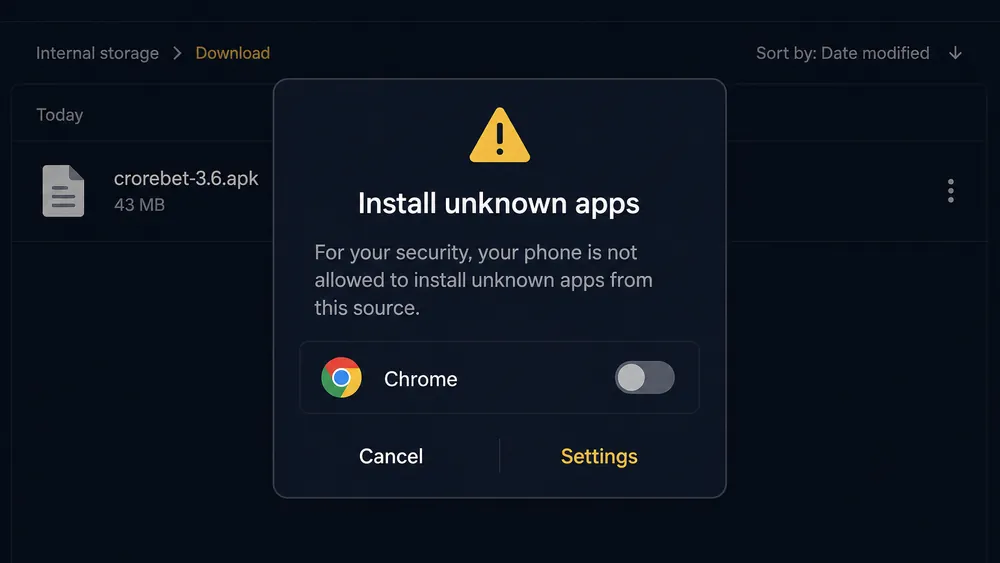
Android shows that prompt once per source app: download through Chrome and Chrome needs the permission, tap the file in a file manager and that app does. Denying it fails silently, which readers mistake for a corrupt download. Full detail on the file and its six permissions is in the APK install guide.
Definition: a part-finished install
An APK that downloads incompletely on a dropping 4G connection still leaves an icon on the home screen. Tapping it does nothing, with no error text. The tell is a file noticeably smaller than 43 MB.
A file sideloaded from a forum or a messaging group may not be the real build at all, and no troubleshooting repairs that. Delete it, then install the current release properly. Which download paths we consider safe is set out on the download hub, and the wider device question on our safety assessment.
Why do budget phones close the app mid-bet?
Memory, almost always. A 2 GB handset running a browser, a messaging app and a live session has nothing spare, so Android reclaims memory from whatever is not in the foreground. Come back from a notification and the app restarts at the lobby, taking your unconfirmed stake slip with it.
| Handset | Cold start | Behaviour during a live session |
|---|---|---|
| Redmi Note 12 (Android 13, 4 GB) | 2.4 s | Stable across a full T20, no restarts |
| Redmi 9A (Android 10, 2 GB) | 6.0 s | Restarted twice in three hours with other apps open |
| Redmi 9A, everything else closed | 5.7 s | No restarts across two hours |
So the answer on a cheap phone is unglamorous: close everything else, stay off battery saver, confirm stakes rather than leaving a slip open. Live casino is the heaviest thing the app does at roughly 250 MB an hour, so dealer tables stuttering while the casino platform is fine is your handset reaching its limit, not a fault; the live dealer section covers what they demand.
Is your 4G connection the real problem?
For frozen lobby tiles and stalled streams, usually yes. The casino client holds an open connection to push game updates, and Indian 4G breaks that far more often than it drops a page load. The screen keeps showing the last tiles it received, so nothing looks wrong until a table has not updated in ninety seconds.
| Connection | Lobby browsing | Live lobby refresh | Live video |
|---|---|---|---|
| Jio 4G, three or four bars | Fine | Refreshed reliably | Watchable at low quality |
| Jio 4G indoors, one or two bars | Slow but usable | Froze twice in an hour | Buffered constantly |
| Airtel 4G, evening peak | Fine | Paused, recovered on refresh | Frequent rebuffering |
| Home Wi-Fi | Fastest of the four | No freezes recorded | Stable |
| VPN active on 4G | Noticeably slower | Frequent stalls | Largely unwatchable |
Three fixes, in order. Switch to Wi-Fi where you can, since it removes cell handovers and the whole frozen-lobby family with them. Turn off any VPN, because a distant exit adds latency the live feed cannot absorb — every metric we measured was worse with one running. And if other sites load normally while this app resolves slowly, setting private DNS to a public resolver is a one-minute experiment.
Do not treat a VPN as a fix. It degrades the connection the live feed depends on, it can conflict with the terms you accepted, and it does nothing about the legal position where you live. Rules on real-money gaming differ by state and the national framework is contested in the courts — check what applies to you before you play.
Data volume is the quiet culprit behind the rest: lobby browsing costs 8–12 MB an hour and live casino play 35–60 MB, so a quota spent by evening throttles you to speeds that look exactly like an app fault.
Test it on a stable connection
Aviator, Teen Patti and 8,000+ casino titles · Hindi and English.
Open the AppWhat are the iPhone and web-app equivalents?
There is no App Store build, so iPhone users run a web app added to the home screen from Safari, and that changes which fixes apply. You cannot clear an app cache from Settings the Android way and there is no APK to reinstall, but each Android step has an equivalent.
- Instead of clearing app cache: Safari settings, clear website data. This signs you out, so have the password ready.
- Instead of reinstalling: remove the home-screen icon and add it again from Safari. Your account is untouched.
- Instead of battery optimisation: switch Low Power Mode off. It stalls live prices exactly as data saver does on Android.
- Instead of storage housekeeping: close other Safari tabs. A crowded browser evicts the web app from memory mid-session.
Two web-app limits are inherent rather than repairable: push notifications are unreliable, and a browser session times out sooner than an installed one. The full Safari sequence is on the iPhone web-app page. If the trouble is codes and sign-in, the login and OTP guide is the right page, and account states that block access from the start sit in the sign-up and KYC guide.
Is it a server outage or your own device?
One test settles it in about a minute: open the same account in a mobile browser, ideally on another network. Both talk to the same servers, so if both fail the fault is theirs, and if only the app fails it is yours. Everything else is guesswork.
| App | Browser on the same account | Conclusion | What to do |
|---|---|---|---|
| Fails | Works | Local to your handset | Run the eight Android steps |
| Fails | Fails on the same network | Network or account, undecided | Repeat on Wi-Fi or another SIM |
| Fails | Fails on another network too | Server side or a restriction | Contact live chat, stop reinstalling |
| Works, but slowly | Works, but slowly | Peak congestion, both ends | Wait it out, avoid live-table stakes |
Genuine outages exist and they are short. During peak hours on 16 August 2026 the live table list took roughly forty seconds to populate on the app and a desktop browser alike, then recovered on its own; a reinstall mid-way would have cost the session for nothing.
One distinction matters more than the rest: a failing app is a nuisance, a restricted account is a different problem wearing the same clothes. If the browser takes your credentials and then refuses the lobby, or a withdrawal is held while gaming works, that is an account state — the withdrawal and holds page explains those, and our trust verdict covers what we could verify.
When and how should you escalate to support?
Escalate once the outage test points away from your handset, or when the eight Android steps are done and the fault survives a clean reinstall. Before that, support will tell you to clear cache and reinstall — the loop you are trying to leave.
- Capture evidence before closing the screen
Screenshot the error and note the time to the minute. "The app is not working" gets a script; a timestamped screenshot gets a person.
- Collect your device details
Phone model, Android version, app version, and whether you were on mobile data or Wi-Fi. Sending these up front removes a round trip.
- Open live chat and list what you tried
Say plainly that cache clearing, a reinstall and a network switch all failed. That moves you past the first tier.
- Ask for a ticket reference, then email it
A written trail matters if money is involved. Keep any bank or UPI reference with it.
Support answered in Hindi and English at 3 minutes 40 seconds on 15 August 2026. Fast for a first response, though a first response is not a resolution. Escalation paths and a complaint template are on the customer care page.
Keep money problems out of the same conversation — a deposit debited but missing from the balance has its own evidence trail, and the deposit guide covers that route. If you need the app working now, reinstall the current build and use the browser meanwhile.
Pros and cons of the app's reliability
Pros
- Ran through a full T20 on a 4 GB phone with no restarts
- Most faults are local and fixable in under twelve minutes
- Cold start of 2.4 seconds on a current mid-range handset
- Nothing is lost in a reinstall — balance and history are server side
- Live chat replied in under four minutes when we needed it
Cons
- Frozen lobby tiles show no error, so a stale screen looks live
- Restarted twice in three hours on a 2 GB Redmi 9A
- No Play Store updates, so old builds linger and cause login loops
- iPhone users lose the app-level fixes Android users have
How reliable is the app, honestly?
Solid on current hardware, demanding on old hardware, and poor at telling you what went wrong. On a 4 GB phone with a decent signal we found very little to troubleshoot across a fortnight. On a 2 GB handset the same sessions needed housekeeping — other apps closed, battery restrictions off, storage clear — which is the reality for a large share of Indian users. The weak point is not stability but feedback: frozen prices and blank cashier screens fail silently, pushing people into reinstall cycles that were never going to help. Work the symptom table instead. And a working app is no reason to bet more than you can lose; outcomes are uncertain and losing is the common result.
Get a clean, current build
Version 3.6 · Android 8.0+ · UPI deposits from ₹100 · IMPS payouts.
Install Crorebet- 18+ only
- Anjouan licensed
- 43 MB download
- Hindi & English
Frequently asked questions
Why is my Crorebet app not working?
Nine faults cover almost every case: a stale cache, a part-finished install, a full storage partition, battery optimisation killing the app in the background, data saver, an outdated version, a weak 4G cell, a VPN, or a genuine server outage. Work down the symptom table before reinstalling anything.
How do I clear the Crorebet app cache?
Open Android Settings, tap Apps, find Crorebet in the list, then Storage. Tap Clear cache first and relaunch. Clear storage wipes the saved session too, so you sign in again afterwards. Cache clearing fixed stuck splash screens on our Redmi 9A on 19 August 2026.
Crorebet app open nahi ho raha hai to kya kare?
Pehle phone restart kariye, phir Settings se app ka cache clear kariye. Storage 500 MB se kam ho to kuch photos delete kariye. Battery optimisation ko off rakhiye. Itna karke bhi na chale to APK dobara install kariye, version 3.6 confirm karke.
Why does the casino lobby stop refreshing during a live session?
The live feed needs a steady socket connection, and a handover between 4G cells drops it silently. Game tiles then freeze while the screen still looks live. Pull down to refresh, or switch to Wi-Fi. Never confirm a stake on a lobby that has not updated for a minute.
Is the deposit screen blank because of my bank?
Rarely. A blank cashier is usually the app's web view failing to load, which a cache clear and a network switch fix in most cases. If the cashier opens but the UPI request never reaches your app, that is the payment leg rather than the app, and the deposit guide covers it.
Live stream buffer ho raha hai, kya karu?
Video quality kam kar dijiye aur Wi-Fi par chale jaiye. Live casino roughly 250 MB per hour kha jata hai, isliye 4G par buffering common hai. VPN chalu ho to band kariye. Peak hours par stream ke bajaye RNG games khelna zyada safe hai.
Will reinstalling the app delete my balance?
No. Balance, game history and verification status sit on the operator's servers, not on your handset, so a reinstall only removes the local files and the stored session. You sign in again afterwards. Any stake slip you had built but not confirmed is lost, which is the only real cost.
How do I tell an outage from a problem on my phone?
Open the same account in a mobile browser on a different network. If the browser version also fails, the fault is server side and no amount of reinstalling helps. If the browser works while the app does not, the problem is local to your handset and the Android checklist applies.
What should I send support when nothing works?
Your registered number, the app version from Settings, your phone model and Android version, the exact error text, the time it happened and a screenshot. Our support test on 15 August 2026 drew a first human reply in 3 minutes 40 seconds when the report was that specific.