
Crorebet Download: Every Way to Get the App in India
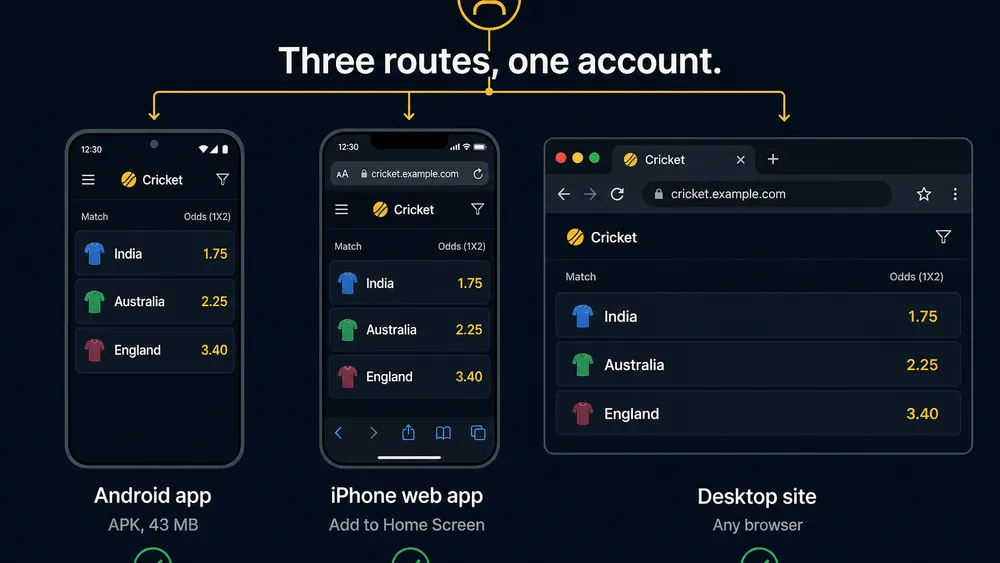
A Crorebet download takes five shapes: the 43 MB Android package, an iOS home-screen web app added through Safari, the mobile site, a desktop browser, and an Android emulator on a PC. Only the Android route saves a file. All five open the same account and balance.
Get the Android package
Version 3.6 · roughly 43 MB · ₹0 · Android 8.0 and above.
Download the Android File- 18+ only
- Anjouan licensed
- Hindi and English
- UPI supported
- IMPS payouts
- UPI
- PhonePe
- Google Pay
- Paytm
- IMPS
Five download routes, side by side
Pick the row matching the device in your hand, not the one with the most ticks. Every figure below came off our handsets in Pune during August 2026.
| Route | What you download | Storage used | Push alerts | Odds speed |
|---|---|---|---|---|
| Android package (APK) | 43 MB file, installed manually | ~90 MB | Full | Fastest |
| iOS home-screen web app | Nothing — Safari adds an icon | ~35 MB cache | Limited | Near |
| Mobile browser | Nothing | Cache only | None | Near |
| Desktop browser | Nothing | Cache only | None | Near |
| Emulator on a PC | 43 MB file plus the emulator | 2 GB and up | Desk only | Laggy |
Last verified: 20 August 2026 on a Redmi Note 12, a Redmi 9A and an iPhone 12, over Jio 4G.
On this page
Why is there more than one download route?
Because neither mobile app store carries the app, so each platform needs its own delivery method. Google Play excludes real-money casino apps aimed at India, and Apple requires per-territory operator licensing. With both storefronts shut, Android users get a package file, iPhone users a browser shortcut, desktop users the site as it is.
The routes differ in quality, not content: casino platform, cashier, bonus terms and balance are identical, while notifications, speed and storage are not. With no store account holding your history, nothing reinstalls the app for you later. The Android install guide covers the file itself in depth.
What does each route actually give you?
The gap between best and worst is smaller than it looks: a browser session lagged the native app by under a second in our side-by-side check on 18 August 2026.
Android package — the complete version
The only route that installs a real application. You get push alerts, the quickest lobby refresh of the five, and an icon that survives a cache clear. The cost is manual updating.
iOS home-screen web app — close, not identical
An iPhone home-screen icon opens full-screen with no address bar. Gaming, deposits, document upload and withdrawals work; notifications and background refresh are where it falls short. Our iPhone setup walkthrough has the Safari steps.
Mobile browser — nothing to install
Gaming from a tab suits a full or borrowed phone. You lose alerts and re-enter credentials more often, because browser sessions expire sooner than app sessions.
Desktop browser — the research screen
A laptop viewport shows a full casino category list without scrolling, which beats a 6-inch screen for lobby browsing comparison. Deposits use the same UPI flow, approved on your phone.
Emulator on a PC — the route to skip
BlueStacks and its rivals install the package inside a virtual Android device on Windows. It works and remains the worst choice: emulated touch adds latency while live table limits move, and some operators flag emulator sessions in anti-fraud review.
One file, ₹0, under a minute on 4G
43 MB on the build we measured · Hindi default, English available.
Start the 43 MB DownloadHow much data does each route cost?
The download is the cheapest part of owning this app. The 43 MB file costs about 3% of a 1.5 GB daily pack; two hours live casino play costs double that.
| Route | One-time cost | Per hour in use |
|---|---|---|
| Android package | 43 MB | 8–12 MB lobby browsing, 35–60 MB live casino play |
| iOS home-screen app | ~6 MB first load | 10–14 MB lobby browsing, 40–65 MB live casino play |
| Mobile browser | ~6 MB first load | 12–16 MB lobby browsing, 45–70 MB live casino play |
| Desktop browser | ~9 MB first load | 15–20 MB lobby browsing |
| Live dealer tables | — | ~250 MB |
Measured with Android's data counter across three sessions between 14 and 20 August 2026 on Jio 4G.
Which route is kindest to a small data pack?
The Android package, because it caches icons and market templates locally while a tab re-fetches them. Across ten hours lobby browsing and four live casino play it used about 310 MB, against roughly 420 MB in a browser.
Which route suits your phone?
Match your device to a row and stop reading. Three factors decide it: operating system, free storage and Android version.
| Your device | Best route | Why |
|---|---|---|
| Android 10–15, 3 GB RAM up | Android package | Full alerts, fastest lobby refresh, least data per hour |
| Android 8–9, 2 GB RAM | Package, with caution | Runs, but a 6-second cold start |
| Android 7 or older | Mobile browser | Below the 8.0 minimum to install |
| Under 200 MB free storage | Mobile browser | The app needs 90 MB plus download room |
| iPhone or iPad, iOS 14+ | Home-screen web app | The nearest thing to an app iOS allows |
| iPhone on iOS 13 or older | Safari tab | Home-screen behaviour is unreliable below 14 |
| Windows or Mac laptop | Desktop browser | No installer exists, and none is needed |
Do both. Install on your phone and use a laptop browser for research — one account, one balance. Device sign-in is covered on our login and OTP page.
What is a mirror link, and why is it the main risk?
A mirror link is a copy of the installation file hosted by somebody other than the operator, and an unofficial one is the largest single risk in this process. Nothing inside a package file announces who built it, so a mirror can serve a modified build under the same name and icon.
Definition: mirror link
A mirror is a secondary location serving a copy of a file, usually to spread traffic or sidestep a block. Legitimate mirrors serve byte-identical copies. Unofficial mirrors have no obligation to, and the file they hand you may have been repackaged before upload.
Verification is what makes this bite harder than a store download. Google screens and signs Play submissions; a sideloaded file has neither guarantee, and no published SHA-256 hash exists to close the gap.
How do you tell a bad copy from a good one?
File size outside the 28–43 MB band is the clearest tell, since a 2 MB "installer" is a stub that fetches something else later. A page demanding you disable antivirus is the second signal, and any file sold on claims of altered balances is malware. A multi-engine scan through a service such as VirusTotal catches the crude ones.
Download from one place and stop. Files circulating in Telegram groups and on aggregator sites are the usual vector for repackaged builds. Collecting three copies to compare triples your exposure rather than protecting you.
What the app can reach on your phone is handled on our app safety assessment.
How much storage do you need?
Keep 150 MB free on Android: the download takes 43 MB, the installer needs unpacking room, and the app settles at roughly 90 MB after a week of cached images. The iOS route needs 60 MB and leaves ~35 MB of Safari cache; an emulator wants 6 GB.
What happens if storage runs out mid-install?
The installer stops with a generic "App not installed" message that names no cause, which is why the error confuses people. Free 200 MB by clearing WhatsApp media, then tap the same downloaded file again — refetching is unnecessary. Install-stage errors are catalogued on the troubleshooting matrix.
Housekeeping: Android keeps the package in Downloads afterwards, occupying 43 MB for nothing. Delete it once the icon appears.
Stuck on Android 7 or older?
The file will not install, and no setting changes that. Android 8.0 is the published minimum and the package targets an API level older releases cannot load, so the installer refuses before it starts rather than failing halfway.
Use the mobile site instead. On a Redmi 4A running Android 7.1 we opened the casino lobby in Chrome on 16 August 2026: Aviator loaded in 5.8 seconds and a ₹100 test stake placed and settled normally. You give up push alerts and a shorter tap path, neither of which affects a stake or a payout.
If Android 7 is on your phone because an update is pending rather than unavailable, check Settings → System → System update. Moving to 8.0 opens the package route.
How do you download on a slow 4G connection?
Stay in one spot and resume rather than restart — those two habits fix most failed downloads on a weak cell. Stability beats speed here, because a package that arrives short of its full size fails at install with no useful error.
- Find a stable spot first
Check your signal bars and stay put. A transfer hopping between cells truncates files.
- Close streaming and sync apps
Quit video apps and pause cloud backup. On a 2 Mbps cell they compete for bandwidth and stall the transfer.
- Leave the notification alone
Let the phone idle once progress appears. Swiping the notification away cancels the transfer on several Android skins.
- Resume, never restart
If it drops, open your browser's downloads list and tap Resume. Starting from zero wastes the data you spent.
- Confirm the finished size
Check the file sits between 28 MB and 43 MB. Anything smaller is incomplete and should be deleted.
Our worst-case measurement: on 14 August 2026, on a 1.8 Mbps Jio cell in a Pune basement, the 43 MB file took 4 minutes 6 seconds. We forced aeroplane mode at the halfway mark, then resumed — the completed file was the correct size and installed without complaint.
How do you re-download after a phone change?
You fetch the file again on the new handset and sign in; nothing needs restoring. Balance, game history, bonus progress and verification are server-side records attached to your account, not data held in the old phone's copy of the app.
- Leave the old phone alone
Do not uninstall anything until the new device works. Keeping a working copy costs nothing.
- Move the registered SIM across
Sign-in confirmation arrives by SMS, so your number must be reachable on the new phone or one beside it.
- Download the current build fresh
Do not send the old file over Bluetooth. Fetching again puts you on the newest version.
- Sign in with existing details
Use the same number and password. Do not create a second account: one per person is the rule and duplicates get frozen.
- Check the balance and open positions
Compare both against the old phone. They share one server record and should match immediately.
We ran exactly this on 21 August 2026, moving from the Redmi Note 12 to the Redmi 9A. Sign-in took one SMS code, and a ₹340 balance with three settled rounds appeared 4 seconds after login.
Do you have to verify your identity again?
No — completed verification attaches to the account, so a new device inherits it. If you never finished, the new phone prompts you at the same point the old one did. Document rules sit on the registration and KYC page.
New phone, same account
Sign in with your registered number · balance and KYC follow you.
Open the Current Build- UPI
- PhonePe
- Google Pay
- Paytm
- IMPS
Pros and cons of the download choices
Pros
- Five routes cover every phone, tablet and laptop in Indian use
- 43 MB is small for the category, and it costs ₹0
- Browser routes need no install and no permission dialog
- Account, balance and bonus progress are shared across routes
- A dropped download resumes instead of starting over
Cons
- No store listing, so nothing updates or restores itself
- No published file hash to verify a mirrored copy against
- Android 7 and older are excluded outright
- The emulator route is possible and still a bad idea
Verdict: which download should you choose?
For most readers the Android package wins on unglamorous grounds: 43 MB once, less data per hour than a browser tab, and the only route that tells you a match has started. The iPhone home-screen app is a close second, losing notifications and background refresh. Browser play deserves more respect than it gets — the right answer on a full, old or borrowed phone, giving up nothing that affects a stake or a payout. The emulator is the one route we would talk you out of. Whichever you pick, the risk that matters is the source you fetch from.
Ready to download?
Version 3.6 · 43 MB · ₹0 · Hindi and English · Android 8.0 and above.
Claim the Free Download- 18+ only
- Anjouan licensed
- UPI supported
- ₹100 min deposit
- IMPS payouts
Frequently asked questions
How do I download the Crorebet app in India?
On Android you save a 43 MB package file in Chrome and allow your browser to install it once. On an iPhone there is no file at all: you open the site in Safari and add it to your home screen. Both routes cost ₹0.
How big is the Crorebet download?
The Android package measured 43 MB on version 3.6, and 2026 releases have shipped from 28 MB upwards. Keep 150 MB free, because the installed app grows to roughly 90 MB once it caches match images. The iOS route downloads nothing.
Crorebet download kaise kare?
Android phone par Chrome kholiye, download button dabaiye aur 43 MB ki file save kijiye. Android ek baar permission maangega — Chrome ko allow kariye, phir Install dabaiye. iPhone par koi file nahi hoti, Safari se Share menu me Add to Home Screen chuniye.
Is there a Crorebet download for iPhone?
There is no App Store listing and no installable file for iOS. iPhone owners get a home-screen web app added from Safari's Share menu, which runs the same account and cashier inside a full-screen browser shell rather than a native binary.
Can I download the app on a laptop?
No desktop installer exists for Windows or macOS. Use the site in any desktop browser, which needs no download and suits lobby browsing research on a big screen. An Android emulator can run the phone package, but it adds input lag.
Is a mirror link safe to download from?
Treat unofficial mirrors as unsafe. A mirror is any third-party copy of the package, and nothing stops its host repackaging the file with extra code. Because no SHA-256 hash is published, you cannot prove a mirrored copy matches the original.
How much data does the download use on 4G?
About 43 MB once, roughly 3% of a 1.5 GB daily pack. Running the app costs far more over time: 8–12 MB per hour on casino lobby browsing, 35–60 MB per hour live casino play and close to 250 MB per hour on live dealer tables.
Do I need to download again after changing my phone?
Yes on Android, because the package is tied to the device rather than a store account that could restore it. Download the current build on the new handset and sign in with the same number. Balance, game history and KYC follow the account.